A. Literacy Connections and Applications / C. Comprehension: Understanding and Responding to Texts · Understanding and Responding to TextsSmart Researcher, Safe Digital Citizen
A2.1 A2.2 A2.3 A2.6 A2.7 A1.1 A1.2 A3.1About 45 minutes
Learning goals- I can gather information from more than one source and check if it is reliable.
- I can tell the difference between information and an ad.
- I can take notes in my own words and say where my information came from.
- I can keep my private information safe and ask permission online.
- I can be kind, respectful and inclusive online and think about my digital footprint.
- I can use the design process to solve a real problem.
Words to know
source
Where information comes from: a book, a website, a video or a person.
reliable
Able to be trusted because it is from an expert and the facts can be checked.
digital footprint
The trail of everything you post, search and share online. It can last a long time.
digital citizen
A person who uses technology safely, responsibly and kindly.
privacy
Keeping your personal information to yourself and your trusted grown-ups.
permission
Saying yes or getting a yes before doing something, such as posting a photo.
cyberbullying
Being mean to someone again and again using phones, games or the internet.
transferable skills
Skills you can use in every subject and in life, like thinking critically, being creative, working together and communicating.
Remember from Grade 2
In Grade 2 you learned the 3 checks (Who made it? Do two sources agree? Does it make sense?), the THINK rule for posting, keeping private information private, and the steps of the design process.
In Grade 3 you will spot ads that look like information, take notes in your own words, say where you found your facts, and think about your digital footprint and rights and responsibilities online.
Hook: Lucas's bird question
Lucas filled his bird feeder in January. Lots of birds came, even though it was −18°C! He wondered: Which birds stay in Ontario all winter?
He found four sources. Read them like a detective.
Source 1: A library book, Birds of Ontario, written by a scientist who studies birds. Published 2024. Black-capped chickadees, blue jays and northern cardinals stay in Ontario all winter. Most robins fly south, but a few stay.
Source 2: A website from a provincial park, written by park naturalists. In winter, watch for chickadees, blue jays and cardinals at your feeder.
Source 3: A colourful video with a bag of seed: "Only SUPER SEED brings cardinals to your yard! Buy now, only $24.99!"
Source 4: A comment in a game chat by BirdzRule2020: "ALL birds fly to Florida in winter lol."
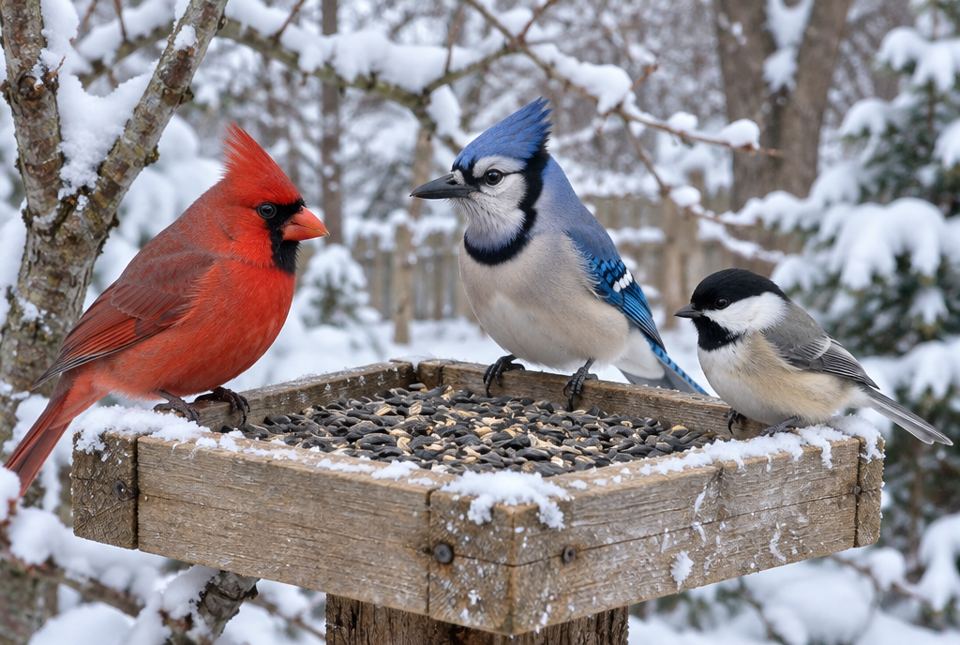 These are the three birds the sources agree stay in Ontario all winter: the red cardinal, the blue jay and the little black-capped chickadee. AI-generated image
Worked exampleLet's evaluate the sources
Which sources should Lucas trust? Why?
- Source 1: Written by a bird scientist (an expert), recent (2024). Reliable.
- Source 2: From a provincial park, written by naturalists. It agrees with Source 1. Reliable.
- Source 3: This is an ad. Its purpose is to sell seed. Only SUPER SEED is not a fact you can trust: cardinals eat many kinds of seed. Not reliable for research.
- Source 4: We don't know who wrote it. It doesn't agree with the other sources, and it doesn't make sense: Lucas can see birds at his feeder in January! Not reliable.
Lucas should use Sources 1 and 2. They are written by experts, recent, and agree with each other. Answer: chickadees, blue jays and cardinals stay all winter; most robins fly south.
Lucas checks each source: Who made it? Is it an ad? Is it recent? Do the sources agree? Only Sources 1 and 2 pass the checks.Is it information or an ad?
Online, ads can look like information. Watch for:
- words like Buy now, Only, Best, Sale, Sponsored, Ad,
- a product or price,
- flashing pictures or pop-ups,
- a claim that only one thing works.
Ads have a purpose: to sell. That doesn't make them evil, but they are not the best source for facts.
Taking notes in your own words
When you research, don't copy sentences word for word. Instead:
- Read a short part.
- Cover it.
- Write the key facts in a few words of your own.
- Check that your notes are correct.
- Write down where you found it (the title and author, or the website name). This is called citing your source. It gives credit to the person who did the work, and lets others check your facts.
Example notes:
- chickadees, blue jays, cardinals stay all winter (Birds of Ontario, library book)
- most robins go south, a few stay (Birds of Ontario)
Different perspectives in research
Good researchers listen to more than one perspective. For a question about birds, you could also ask a local Elder or a birdwatcher what they have noticed over many years, or read what a First Nations community knows about birds and seasons in your area. People who have watched the land for a long time hold important knowledge.
Just for funFunny but true: The black-capped chickadee got its name from its call, which sounds like chick-a-dee-dee-dee. It's a bird that says its own name!
Your rights and responsibilities online
As a digital citizen, you have rights (things you deserve) and responsibilities (things you should do).
Rights: to be safe, to be treated with respect, to have your privacy respected, and to tell a trusted grown-up when something feels wrong.
Responsibilities:
- Ask permission from a grown-up before joining a game, app or website, downloading, or buying anything.
- Ask permission before taking or posting a photo or video of someone else. Their face is their private information.
- Keep passwords secret from everyone except your parents or guardians.
- Never share your full name, address, phone number, school or birthday with people you don't know.
- Treat people the way you want to be treated.
Your digital footprint
Every time you post, comment, like or share, you leave a digital footprint, like footprints in fresh snow. But online footprints don't melt. Even if you delete something, someone may have already copied it.
Before you post, ask: Would I be okay if my teacher, my grandma, or a future friend saw this in 10 years? A positive footprint shows that you are kind, curious and helpful.
Worked exampleLet's decide what to do
Your friend sends a funny photo of a classmate falling in the snow and says, "Let's post it in the class group chat!" What should you do?
- Think about permission: Did the classmate say it's okay to share? No.
- Think about feelings: The classmate might feel embarrassed or hurt. Sharing it could be unkind, and if it keeps happening, it is cyberbullying.
- Think about footprints: Once it's posted, it can't be taken back.
- Decide: Don't post it. Tell your friend kindly, "Let's not. They might feel bad." If the photo gets shared, tell a trusted grown-up.
Don't post it. We need permission to share someone's photo, and being kind online matters as much as being kind in person.
Stop, Block, Tell
If someone online is mean, scary or asks for private information:
- Stop: don't answer.
- Block them (ask a grown-up how).
- Tell a trusted grown-up. You will not be in trouble.
Also take screen breaks: get outside, move, read a paper book. Your body and brain need it.
Being inclusive online
People online come from many cultures, languages, abilities and places. Be respectful of differences:
- Don't make fun of how someone writes, talks, looks or what they believe.
- Include others in online games and projects.
- Use captions on videos and clear words so more people can understand (this helps accessibility).
- When sharing a culture's stories or images, show respect and give credit.
The design process: solving a real problem
Remember: think, plan, make, test, improve. Digital tools can help at each step.
Lucas's problem: Squirrels keep emptying the bird feeder before the birds can eat.
- Think: Who is affected? The birds (and Lucas's wallet!).
- Plan: Research reliable sources (with a grown-up) about squirrel-proof feeders. Sketch ideas.
- Make: Build a baffle (a cone or dome that squirrels can't climb past) from a plastic container. A grown-up does any cutting. Take photos with a tablet to record it.
- Test: Watch for a week. Make a tally chart of birds and squirrels.
- Improve: A squirrel jumped from the fence! Move the feeder farther away.
Skills you used
In this lesson you used transferable skills, skills that help in every subject and in life:
- Critical thinking: checking sources and spotting ads.
- Creativity and problem solving: the design process.
- Self-directed learning: asking your own research question.
- Collaboration: working with a grown-up or classmates.
- Communication: sharing what you learned clearly.
- Global citizenship: respecting people everywhere and caring for nature.
- Digital literacy: using technology safely and wisely.
Hands-on activityMini research project
You need: a question you're curious about, a library book, a grown-up to help search online, paper and a pencil.
- Choose a question about your community or nature, like What animals live in our local park in winter?
- With a grown-up, find three sources (a book, a reliable website such as a government, museum, library or park site, and a person who knows, like a librarian or an Elder).
- For each source, check: Who made it? Is it an ad? Is it recent? Do the sources agree?
- Take notes in your own words (key words, not full sentences). Write the source next to each note.
- Share what you learned in a poster, a short slideshow or a talk. Give credit to your sources at the end.
- Reflect: Which source was most helpful? Which skill did I use most?
Your turn
1Which two sources in Lucas's research are reliable? Why?
Source 1 (the library book by a bird scientist) and Source 2 (the provincial park website by naturalists). They are by experts, and they agree.
2How can you tell Source 3 is an ad?
It shows a product and a price ($24.99), says Buy now and Only SUPER SEED. Its purpose is to sell.
3Why shouldn't Lucas trust Source 4?
We don't know who wrote it, it disagrees with the experts, and it doesn't make sense: birds are at his feeder in January.
4What does it mean to take notes in your own words?
Write the key facts in a few of your own words instead of copying sentences.
5Why should you write down where you found your information?
To give credit to the person who did the work, and so you or others can check the facts later.
6Before you post a photo of a friend, what must you do?
Ask their permission (and a grown-up's).
7What does Stop, Block, Tell mean?
Stop: don't answer. Block the person. Tell a trusted grown-up.
More practice: warm-up
1Is a password something to share with your best friend?
No. Only with your parents or guardians.
2Which birds stay in Ontario all winter, according to the reliable sources?
Chickadees, blue jays and cardinals.
3Name a word that is a clue that something is an ad.
Any one: Buy now, Only, Best, Sale, Sponsored, Ad.
4What is a digital footprint?
The trail of everything you post, search and share online.
5What are the five steps of the design process?
Think, plan, make, test, improve.
More practice: on your own
1A website about lakes was written by a government science group and updated this year. Is it likely reliable? Explain.
Yes, likely. It's written by experts (scientists) and it is recent. You should still check that another source agrees.
2A game asks for your home address to send you a free prize. What do you do?
Don't type it. Your address is private. Tell a trusted grown-up. Free-prize messages are often tricks.
3Why are online footprints different from footprints in the snow?
Snow footprints melt away, but online posts can last a long time and can be copied, even if you delete them.
4Name one way to make an online video more accessible.
Add captions (words on the screen) so people who can't hear, or who are learning English, can understand. (Also: speak clearly, describe pictures.)
5In Lucas's design process, what did he do in the test step? Why does it matter?
He watched for a week and kept a tally chart of birds and squirrels. Testing shows if the solution really works.
Challenge
1Two reliable sources disagree about a small fact (one says chickadees weigh about 11 grams, the other says 12 grams). What should a researcher do?
Find a third reliable source, check which is more recent or expert, or say about 11 to 12 grams. Small differences can happen; good researchers check further and are honest about it.
2A classmate is being left out of an online class game and someone types mean comments about them. Describe two things you could do.
Examples: don't join in; invite the classmate to play with you; write something kind; tell a trusted grown-up or teacher; don't forward the mean comments. (Look for being an upstander and getting help.)
3Name two transferable skills you used in your own reading or research this week, and how.
Example: Critical thinking: I checked who wrote a website. Communication: I explained what I learned to my family. (Any two skills with a real example.)
Quiz
1. Which source is most reliable for facts about birds?
2. Which is a clue that a text is an ad?
3. When you take research notes, you should...
4. Before posting a photo of a friend online, you should...
5. A digital footprint is...
6. Someone online asks for your password. You should...
What this lesson teaches: Grade 3 students gather, evaluate and use information from various sources and perspectives (A2.3); understand their rights and responsibilities online and build a positive digital identity (A2.1); navigate safely, manage privacy and seek permission (A2.2); use digital tools in the design process to solve real problems (A2.6); and communicate respectfully and inclusively online (A2.7). The lesson names the transferable skills (A1.1, A1.2) and shows how research skills apply across subjects and everyday life (A3.1).
How to help at home:
- Search together. Young children should not search alone. Use child-safe search settings and kids' sites from libraries, museums, governments and parks.
- Model asking "Who made this? Is it selling something?"
- Set family rules for screen time, apps, and posting photos. Ask your child's permission before you post photos of them; it shows what permission looks like.
- Make sure your child knows they won't be punished for telling you about something upsetting they saw online.
Common difficulties:
- Copying instead of note-taking. Teach read, cover, write.
- Thinking that anything on the first page of search results is true. Point out ads and sponsored results.
Safety: Building a feeder baffle with cutting involves scissors or a knife; a grown-up should do any cutting. Lucas's sources are made up for practice; the bird facts are real.